> For the complete documentation index, see [llms.txt](https://docs.goboneless.io/llms.txt). Markdown versions of documentation pages are available by appending `.md` to page URLs; this page is available as [Markdown](https://docs.goboneless.io/overview/about-the-architecture.md).
# About the architecture
## What is the architecture used as the foundation for Boneless?
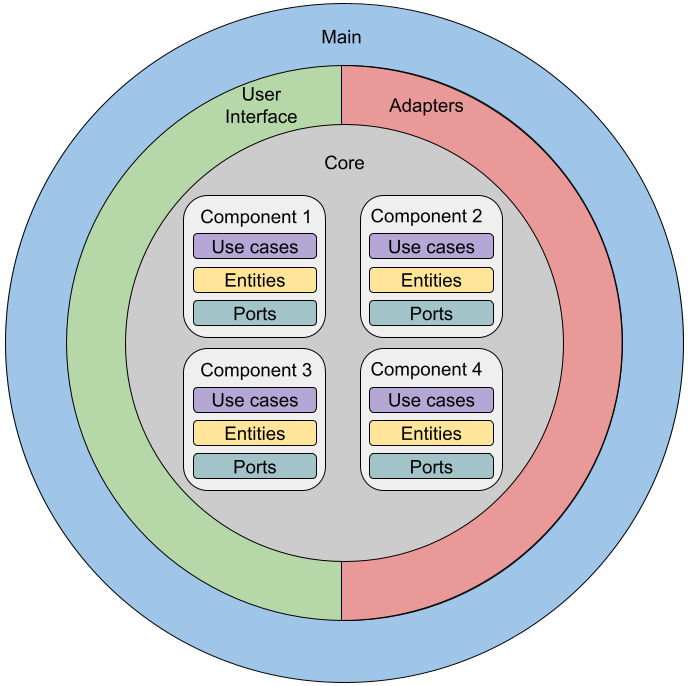
Boneless was inspired by Clean Architecture and offers templates that follow its core concepts. The templates provided by Boneless facilitate the creation of modular, maintainable, and testable codebases by promoting a clear separation of concerns and the independence of business logic from external dependencies. By using Boneless templates, developers can jumpstart their projects with a well-organized structure that aligns with Clean Architecture, enabling them to focus on implementing the domain-specific logic while adhering to best practices. Boneless empowers developers to build robust and scalable applications, leveraging the benefits of Clean Architecture for easier understanding, maintenance, and evolution over time.
Based on Service Weaver, which generates connections between components using gRPC, has greatly facilitated the development of our applications.
## Here is the current repository structure, reflecting the adopted architecture:
```
.
├── cmd
│ └── main.go
├── go.mod
├── go.sum
├── internal
│ ├── app
│ │ ├── component.go
│ │ ├── db
│ │ │ ├── migrations
│ │ │ │ └── schema.sql
│ │ │ ├── query.sql
│ │ │ └── sqlc.yaml
│ │ ├── entity.go
│ │ ├── store
│ │ │ ├── db.go
│ │ │ ├── models.go
│ │ │ └── query.sql.go
│ │ └── weaver_gen.go
│ └── bff
│ ├── bff.go
│ ├── router.go
│ └── weaver_gen.go
└── weaver.toml
```
In this structure, we can observe the organization of directories and files in the repository. The `cmd` directory contains the `main.go` file, which is responsible for starting the application. The `go.mod` and `go.sum` files are used to manage project dependencies.
The `internal` the directory is where the main implementation of the application resides. Inside, we have the `app` directory, which contains components related to the application's domain, such as entities and business logic. The `db` directory is used to store files related to the database layer, such as migrations and SQL queries.
The `store` directory contains files related to data storage, such as the implementation of database access. The `bff` directory contains files related to the implementation of the Backend for the Frontend layer.
Lastly, the `weaver.toml` file is used to configure Service Weaver, which facilitates generating connections between application components using gRPC.
This directory and file structure reflects the adopted architecture in the repository, following the principles of Clean Architecture and facilitating the organization and maintenance of the application's source code.
---
# Agent Instructions
This documentation is published with GitBook. GitBook is the documentation platform designed so that both humans and AI agents can read, navigate, and reason over technical content effectively. Learn more at gitbook.com.
## Querying This Documentation
If you need additional information that is not directly available in this page, you can query the documentation dynamically by asking a question.
Perform an HTTP GET request on the current page URL with the `ask` query parameter, and the optional `goal` query parameter:
```
GET https://docs.goboneless.io/overview/about-the-architecture.md?ask=&goal=
```
`ask` is the immediate question: it should be specific, self-contained, and written in natural language.
`goal` is optional and describes the broader end goal you are ultimately trying to accomplish on behalf of the user. GitBook uses it to tailor the answer towards what is most useful for that goal.
The response will contain a direct answer to the question and relevant excerpts and sources from the documentation.
Use this mechanism when the answer is not explicitly present in the current page, you need clarification or additional context, or you want to retrieve related documentation sections.